

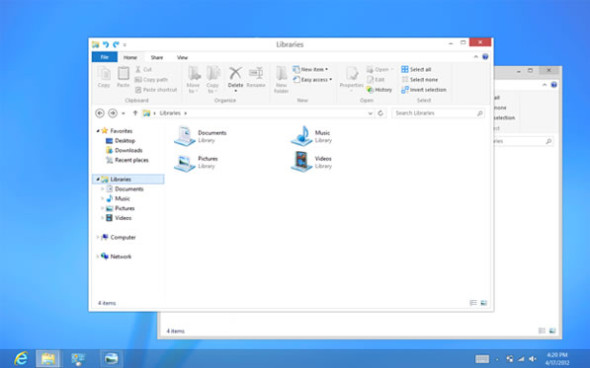
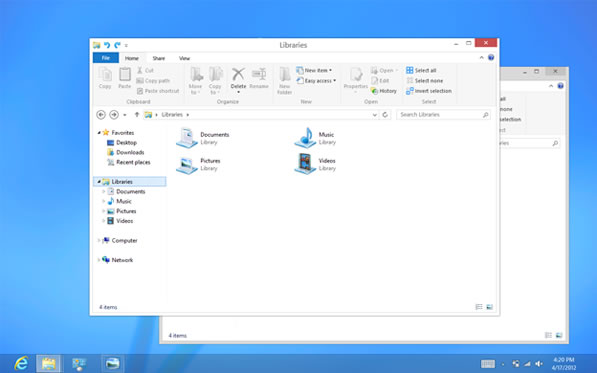
Windows 8 RTM 已經推出,除了介面上的改變外,內裡亦重新規劃簡化了不必要的程式碼。Techspot 就為 Windows 8 與 Windows 7 作效能比拼,Windows 8 在大部分應用均比起 Windows 7 更加出色。
Windows 8 對硬件作出進一步優化,尤其是 SSD,所以效能上更加出色。Techspot 就利用了 Core i7-3960X、16GB DDR3-1866、GTX 670、256GB SSD 等頂級硬件去測試兩者分別。測試項目多達十數項,小編就將部分效能差別較大的分數列出,大家有興趣的可以去 Techspot 網站看進一步評測。
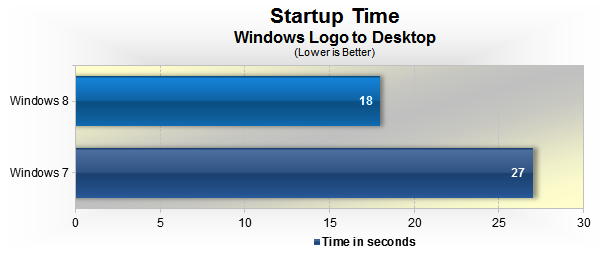
在開機部分,因 Windows 8 減低了不必要的資源,加上 SSD 的優化,明顯見到開機效能快上許多,差別達 33%,如果用上更高效能的 SSD,相信差別會更加明顯。
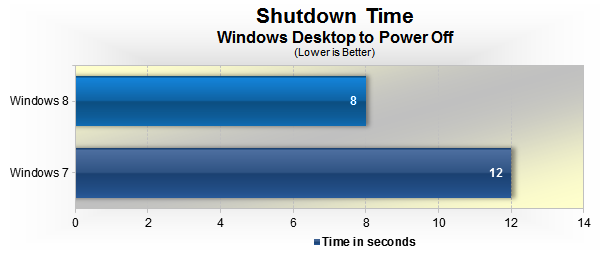
Windows 關機時會回收資源,包括停企驅動桯式等,Windows 8 同樣地能夠較快速地關機。
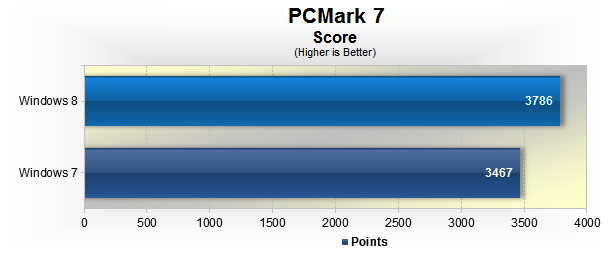
PCMark 7 能夠針對整體效能作出效能評估,亦可以見到分數遠高於 Windows 7。
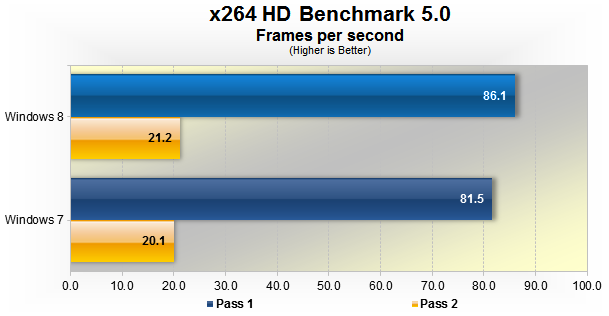
Windows 8 在壓片上效能亦有優勢,2-pass 壓縮上見到第一次壓片更加快速,而第二次壓縮因內容已放入記憶體部分,所以較少分別,但亦証明 Windows 8 對於處理器的優化也有明顯改善。
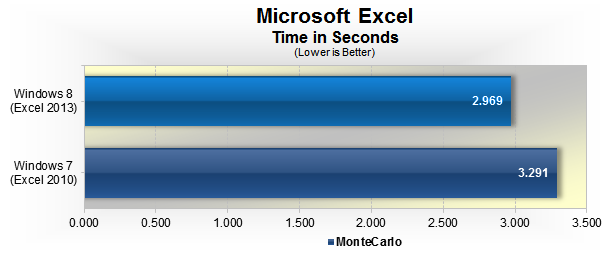
Excel 效能亦快上 10% 左右,不過 Windows 8 配合 Excel 2013 使用,不知道是 Excel 2013 的改良還是 Windows 8 的進步了。
來源:Techspot
分享到 :
最新影片

每次windows出之前都總會有d咁既report…但結果呢?! 繼續一代一代咁推高硬體要求, 淘汰舊硬體資源.
停企驅動桯式
Hello Web Admin, I noticed that your On-Page SEO is is missing a few factors, for one you do not use all three H tags in your post, also I notice that you are not using bold or italics properly in your SEO optimization. On-Page SEO means more now than ever since the new Google update: Panda. No longer are backlinks and simply pinging or sending out a RSS feed the key to getting Google PageRank or Alexa Rankings, You now NEED On-Page SEO. So what is good On-Page SEO?First your keyword must appear in the title.Then it must appear in the URL.You have to optimize your keyword and make sure that it has a nice keyword density of 3-5% in your article with relevant LSI (Latent Semantic Indexing). Then you should spread all H1,H2,H3 tags in your article.Your Keyword should appear in your first paragraph and in the last sentence of the page. You should have relevant usage of Bold and italics of your keyword.There should be one internal link to a page on your blog and you should have one image with an alt tag that has your keyword….wait there’s even more Now what if i told you there was a simple WordPress plugin that does all the On-Page SEO, and automatically for you? That’s right AUTOMATICALLY, just watch this 4minute video for more information at. Seo Plugin
問題是在一些舊電腦上的表現如何…