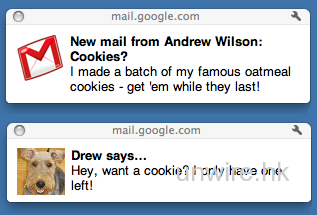
作者忘記分類 Gmail支援桌面通知功能 作者 dave 發佈日期 2011-01-27 閱讀時間 1分鐘 字體大小 A A A 分享 若果你認為不能錯失任何一個電郵,又有習慣經常打開Gmail的話,Google最近加入了一項新功能頗為合用。只要是使用Google Chrome瀏覽器,並在設定中啟動通知功能,日後有新電郵時,就會如圖顯示。用家無需再經常登入Gmail,也可以確保即時回覆重要電郵了。Google稱有關功能是透過HTML5做到的,日後其他瀏覽器也可以用到。 來源 分享到 : 最新影片 Follow 我們 : 650k粉絲Facebook143k訂閱YouTube51k跟隨者Instagram3.7k粉絲X (formerly Twitter)6.6kPostsTelegram Subscribe Login Notify of new follow-up comments new replies to my comments Please login to comment 7 Comments Oldest Newest Most Voted Inline Feedbacks View all comments Adrian 15 years ago 我是用Chromium 的,怎樣開啟這個功能? man 15 years ago Reply to Adrian 到gmail裡的設定吧 Zero 15 years ago Reply to Adrian 怎樣開啟這個功能? Zero 15 years ago Reply to Zero G mail —> setting —-> Desktop Notification —> New mail on Logan 15 years ago ……又有習慣經常打開Gmail的話…… ==>又[習慣]經常打開Gmail的話 ……Google最近加入了一項新功能頗為合用…… ==>Google最近加入的一項新功能[對你便]頗為合用[了] ==>Google最近加入的一項新功能[對你就]頗為合用[了] ==>Google最近加入的一項新功能[就]頗為[適]合[你使]用[了] ……只要是使用Google Chrome瀏覽器,並在設定中啟動通知功能…… ==>Google Chrome瀏覽器[的用戶只要]在設定中啟動通知功能 ==>Google Chrome瀏覽器[的用家只要]在設定中啟動通知功能 ……日後有新電郵時,就會如圖顯示…… ==>[有新電郵時],就會[出現如上圖的顯示] Adrian 15 years ago 不是像作者所講,其實要登入了gmail 才會收到電郵通知, 登出了gmail後是收不到的 katalog stron www 13 years ago Spot on with this write-up, I truly suppose this website wants far more consideration. I’ll most likely be once more to read way more, thanks for that info.

 Gmail支援桌面通知功能
我是用Chromium 的,怎樣開啟這個功能?
到gmail裡的設定吧
怎樣開啟這個功能?
G mail —> setting —-> Desktop Notification —> New mail on
……又有習慣經常打開Gmail的話……
==>又[習慣]經常打開Gmail的話
……Google最近加入了一項新功能頗為合用……
==>Google最近加入的一項新功能[對你便]頗為合用[了]
==>Google最近加入的一項新功能[對你就]頗為合用[了]
==>Google最近加入的一項新功能[就]頗為[適]合[你使]用[了]
……只要是使用Google Chrome瀏覽器,並在設定中啟動通知功能……
==>Google Chrome瀏覽器[的用戶只要]在設定中啟動通知功能
==>Google Chrome瀏覽器[的用家只要]在設定中啟動通知功能
……日後有新電郵時,就會如圖顯示……
==>[有新電郵時],就會[出現如上圖的顯示]
不是像作者所講,其實要登入了gmail 才會收到電郵通知, 登出了gmail後是收不到的
Spot on with this write-up, I truly suppose this website wants far more consideration. I’ll most likely be once more to read way more, thanks for that info.